Installing Glealu
Download the app
Download the installer for your operating system from your purchase confirmation email or from your Polar customer portal.
- Windows: Run the downloaded
.exeinstaller and follow the setup wizard - macOS: Open the downloaded
.dmgfile and drag Glealu to Applications - Linux: Install the downloaded .deb package:
sudo dpkg -i Glealu-*.deb
 →
→
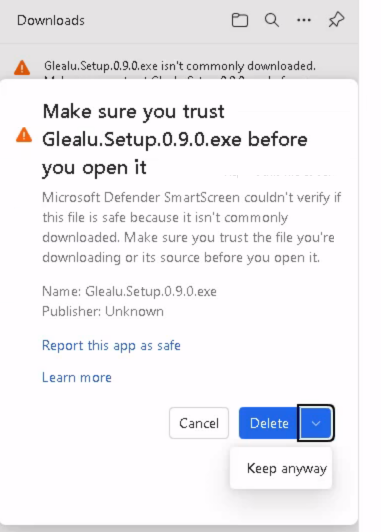
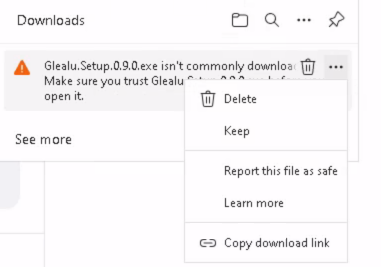
Click Keep and then Keep anyway to save the installer. When running it, Windows SmartScreen may also show a warning — click More info and then Run anyway to proceed.
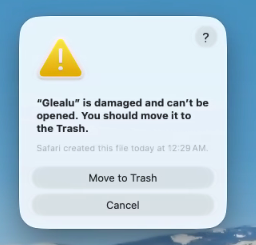
Click Cancel to dismiss the dialog, then open Terminal and run:
sudo xattr -rd com.apple.quarantine /Applications/Glealu.appIf instead macOS says the app is from an unidentified developer, right-click the app and select Open, then click Open in the dialog that appears.
These warnings appear because Glealu is not yet code-signed. This will be resolved in a future release.
Check your hardware compatibility
Glealu's response speed depends on whether your computer has a compatible GPU. Click the button below to check your hardware automatically.
What the results mean
- NVIDIA GPU detected: Excellent — Glealu will respond in seconds. Make sure your NVIDIA drivers are up to date for best performance.
- Apple Silicon (M1/M2/M3/M4): Excellent — Glealu is optimised for Apple Silicon and will run smoothly.
- No dedicated GPU / Intel Mac: Glealu will still work, but responses may take minutes each. This is fine for occasional use but may feel slow for heavy use.
Setting up Ollama
Glealu uses Ollama to run the AI model locally on your computer. Ollama is free and must be installed separately.
Download Ollama
Visit ollama.com/download and download the version for your operating system.
Install and launch Ollama
Run the installer. On Mac, drag Ollama to Applications and launch it. On Windows, run the installer wizard. On Linux, run curl -fsSL https://ollama.com/install.sh | sh in a terminal.
Launch Glealu
Open Glealu. It will detect Ollama automatically and prompt you to download the recommended AI models from the Settings screen.
Download the AI models
In Settings, download a language model and an embedding model. The recommended defaults work well on most hardware. This is a one-time download of approximately 3–5 GB.
Your first document
Upload a document
Click Upload documents in the top bar and select a PDF, TXT or MD file. Glealu reads and indexes it locally — this takes a moment depending on file size.
Wait for indexing
You will see a progress bar as Glealu processes each chunk of your document. When it says "Done!", you are ready to ask questions.
Ask a question
Type your question in the chat box at the bottom and press Enter. Glealu will find the relevant passages and give you an answer with source references.
Uploading documents
Supported formats
Glealu currently supports PDF, plain text (.txt) and Markdown (.md) files. Support for Word documents is planned for a future update.
Multiple documents
You can upload multiple documents at once — select them all in the file picker or upload them one at a time. All uploaded documents are added to the same knowledge base and Glealu can answer questions that span across all of them.
Removing documents
Go to the Documents tab to see all uploaded files. Click Remove next to any document to delete it from the knowledge base. This does not affect other documents.
Asking questions
Ask questions in plain language — exactly as you would ask a colleague. Glealu works best with specific, focused questions rather than broad open-ended ones.
Tips for better answers
- Be specific: "What is the notice period in section 8?" works better than "What are the terms?"
- Reference the document if you have multiple: "According to the Q3 report, what were the main risks?"
- Ask follow-up questions — each question is independent, so give context if needed
- Check the source references shown below each answer to verify which part of the document was used
Saving answers
Click the Save button below any answer to save it to a collection. Collections are organised groups of saved answers — useful for research projects or ongoing work.
- Create collections from the Saved tab in the left sidebar
- Drag and drop saved items to reorder them
- Click Print / Save as PDF to export a collection as a PDF document
Free trial
The Glealu trial is built into the app and starts automatically on first launch. No license key is needed for the trial.
- Duration: 7 days from first launch
- Questions: Up to 20 questions during the trial
- Uploads: Up to 3 document uploads during the trial
When your trial ends, purchase a Standard or Lifetime license from glealu.com and enter your license key in the activation screen.
Activating your license
Find your license key
Your license key was delivered by email after purchase. It looks like GLEALU-XXXXXXXX-XXXX-XXXX-XXXX-XXXXXXXXXXXX. You can also find it in your Polar customer portal.
Enter the key in Glealu
Launch Glealu. If your trial has expired, the activation screen will appear. Enter your license key and click Activate license.
Start using Glealu
Once activated, Glealu will remember your license on this computer. You will not need to enter the key again unless you move to a new machine.
Moving to a new computer
Your license works on up to 2 computers at the same time. If you need to move to a new machine and have already used both activations, you can deactivate from your old computer first.
To deactivate, go to Settings → License in Glealu and click Deactivate on this computer. This frees up one activation slot so you can activate on a new machine.
If you no longer have access to the old computer, contact us at help@glealu.com and we will reset your activations manually.
Slow responses
If answers are taking a long time (more than a few minutes), this is usually because the AI model is running on CPU rather than GPU.
How to speed things up
- Check your GPU: Open Settings in Glealu — if a GPU warning is shown, Ollama is not using your GPU.
- NVIDIA users: Make sure you have the latest NVIDIA drivers installed. Download them from nvidia.com/drivers.
- Try a smaller model: In Settings → Models, try a Q2 or Q4 variant which uses less RAM and runs faster.
- Close other applications: Free up RAM by closing other programs while using Glealu.
Ollama not starting
If Glealu shows "Ollama is not running", try the following:
- Check if Ollama is installed: Look for Ollama in your Applications folder (Mac) or Start menu (Windows).
- Start Ollama manually: Launch Ollama from your Applications folder. It runs in the background — look for its icon in the menu bar (Mac) or system tray (Windows).
- Linux users: Run
ollama servein a terminal to start the Ollama service. - Reinstall Ollama: If the above doesn't help, download and reinstall Ollama from ollama.com/download.
Once Ollama is running, click Try again in Glealu.
Inaccurate or incomplete answers
AI models can sometimes produce answers that are incomplete, inaccurate or hallucinated. Here are some steps to improve answer quality:
- Use a larger model: In Settings → Models, try a Q8 or larger variant for better accuracy — though this requires more RAM.
- Ask more specific questions: Narrower questions tend to produce better answers than broad ones.
- Increase answer sources: In Settings → Advanced → Answer sources, increase the number from 3 to 5. This gives the model more context to work with.
- Check the source references: Each answer shows which pages it used. If the relevant page is not listed, the model may not have found the right section — try rephrasing your question.
Llama runner error or garbled responses
If you see an error message containing "llama runner process has terminated" or receive responses with garbled, repetitive or nonsensical text, this is almost always caused by the selected AI model requiring more GPU memory (VRAM) than is available on your machine.
How to fix it
- Go to Settings → Models
- Under your current model family, select a Q4 or Q2 variant instead of Q8
- Download the smaller variant and select it as your active model
- Try your question again
Why this happens
Larger model variants (Q8) produce higher quality answers but require significantly more VRAM. If another application is also using the GPU, or if your machine has less dedicated VRAM than the model requires, Ollama cannot load the model and terminates the process. Switching to a smaller variant reduces VRAM usage and resolves the issue.
Security & privacy
How Glealu keeps your documents private
Glealu is built around a simple principle: your documents never leave your computer. The AI model runs locally using Ollama, a local inference engine that listens only on your own machine at localhost:11434. It makes no outbound connections while processing your documents or answering your questions.
The open source foundation
Glealu is powered by the following open source components, each of which can be independently verified:
The local AI engine that runs models on your hardware. No telemetry, no outbound connections during inference.
View source on GitHub →The recommended language model. A static mathematical weight file — it has no network capability and cannot transmit data.
View model card →The embedding model that understands your questions and finds relevant document passages. Runs entirely locally.
View model card →Alternative language models available via Ollama for users who prefer them. The same local-only privacy guarantees apply.
Browse available models →How to verify it yourself
If you want technical confirmation that no data leaves your machine during use, you can monitor all network traffic while Glealu processes a document. On any platform, a network monitoring tool such as Wireshark will show zero outbound connections from the Ollama process during document indexing or question answering. The only external connections Glealu makes are for license validation to api.glealu.com — never for document content.
Sensitive and confidential documents
Glealu is well suited for documents that cannot be uploaded to cloud AI services for privacy, policy or regulatory reasons. However, Glealu is only as secure as the computer it runs on and does not add any additional security layer beyond your operating system.
- If your organisation has policies about which applications may be installed on work computers, seek approval before installing Glealu on a machine used for sensitive documents.
- Glealu is not designed or certified for classified, secret or military information of any kind.
- The responsibility for ensuring your computer is an appropriate place to process sensitive information remains with you and your organisation.
Video guides
Step-by-step video guides are coming soon. In the meantime the written guides above cover everything you need to get started.
Getting started with Glealu — coming soon
Installing Ollama and downloading models — coming soon
Asking questions and saving your research — coming soon
Still need help?
If you couldn't find the answer you were looking for, we are happy to help directly.
Contact support
Send us a description of your issue and we will get back to you as soon as possible.
Email help@glealu.comWhen reporting an issue, it helps to include your operating system, the version of Glealu you are using, and a description of what you were doing when the problem occurred.